Monitor audio quality on Yealink phones#
The last few days I have been troubleshooting some quality issues. While doing this I found a tool that has been very helpful and wanted to share it with the group.
It is easy to monitor the audio quality on a Yealink phone, and it can be done remotely. I was! able to watch in real-time as a user was on a call.
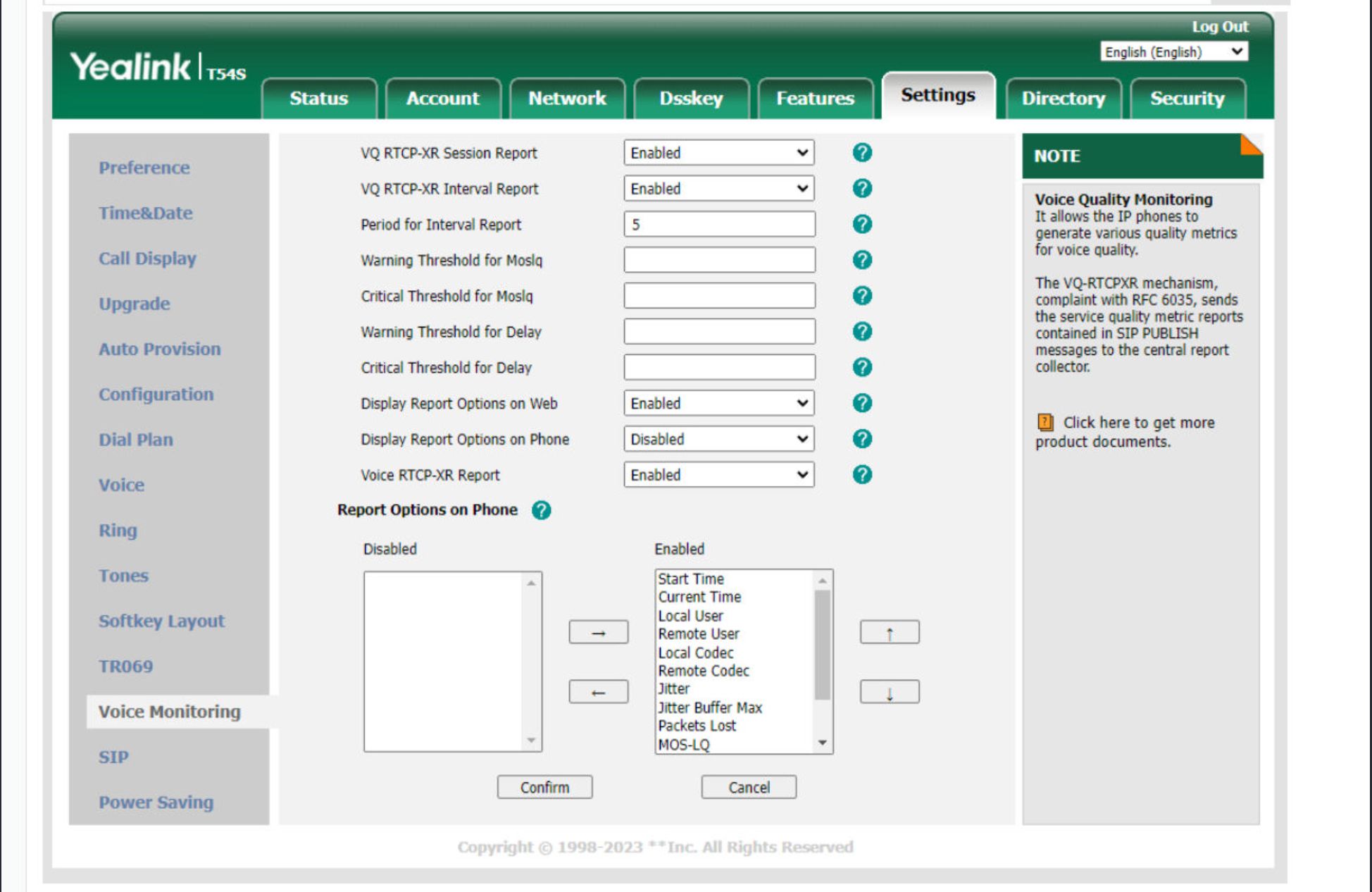
Directions
- Log into the Yealink phone from the administrative portal. You can get the IP address by pressing the ok button on the phone. The default user/pass is admin/admin until it is changed.
- Go to the Settings tab
- Click on the Voice monitoring tab on the left
- Change the following settings:
- VQ RTCP-XR Session Report = Enabled
- VQ RTCP-XR Interval Report = Enabled
- Period for Interval Report = 5
- Display Report Options on Web = Enabled
- Voice RTCP-XR Report = Enabled
- Add the options you want to the Enabled column
- Click Confirm
- Make a call using this phone.
- On the top menu, go to Status
- Click on the RTP Status tab on the left
Now you can view the stats of the last call. The stats will also update every 5 seconds during the call. This value is set above in the "Period for Interval Report" settings. The value range is 5-20.
| Start Time | The exact start time of the call | End Time | The exact end time of the call |
| Local user | SIP account used for the call | Remote user | Internal number user |
| Local IP | the local IP address of the SIP phone | Remote IP | The IP address from Kwebbl used for the call |
| Local port | local port used for the call | Remote port | Remote port used for the call |
| Local CODEC | Local CODEC used for the call | Remote CODEC | CODEC used from Kwebbl |
| Jitter | indicating variations in packet arrival time | JitterBufferMax | indicating variations in packet arrival time |
| Packet loss | The amount of packets lost during the call | NetworkPacketLossRate | The amount of packets lost during the call |
| MOS-LQ | Quality score Listener | MOS-CQ | Quality score conversation |
Extra information:
Packet Loss - If Packets are lost during a call, the user will hear an audio drop or 'glitch'. In most scenarios, the packets are lost in the local network or internet connection from the customer.
MOS - Mean Opinion Score - is a measure used to give a call a score. The MOS is expressed as a single rational number, typically in the range 1–5, where 1 is the lowest perceived quality, and 5 is the highest perceived quality. VoIP calls often are in the 3.5 to 4.2 MOS range. The following chart can be used as a guide for VoIP MOS testing and a good comparison for voice quality.
| Number | Yeah |
|---|---|
| 4.3 - 5.0 | Very satisfied |
| 4.0 - 4.3 | Satisfied |
| 3.6 - 4.0 | Some users are satisfied |
| 3.1 - 3.6 | Many users dissatisfied |
| 2.6 - 3.1 | Nearly all users are dissatisfied |
| 1.0 - 2.6 | All users are dissatisfied |